WhatsApp lead capture vs website contact forms
Compare WhatsApp lead capture and website contact forms for response speed, lead quality, routing, mobile conversion, and team handoff.
Share this article
Share the article link with your team or network.
Website contact forms still work. They are structured, easy to route, and familiar to teams. But they can feel slow on mobile and often create a delayed conversation.
WhatsApp lead capture works differently. It starts where many customers already want to talk, then uses a workflow to collect the structure a form would normally provide.
Where website contact forms still work well
Forms are useful when the customer is willing to complete a structured request before any conversation starts. They also work well for low-urgency enquiries, formal applications, and cases where the business needs specific fields before replying.
- Clear field validation
- Easy CRM mapping
- Good fit for desktop research traffic
- Useful for formal requests and longer applications
Where WhatsApp lead capture is stronger
WhatsApp is stronger when the customer wants a quick, mobile-first conversation. It is often a better fit for ads, local services, bookings, urgent support, and high-intent mobile traffic.
The challenge is that normal WhatsApp chat is unstructured. That is where a guided workflow matters.
- Lower friction for mobile users
- Faster first response expectations
- Better fit for customers who prefer messaging
- Natural path from click-to-WhatsApp campaigns
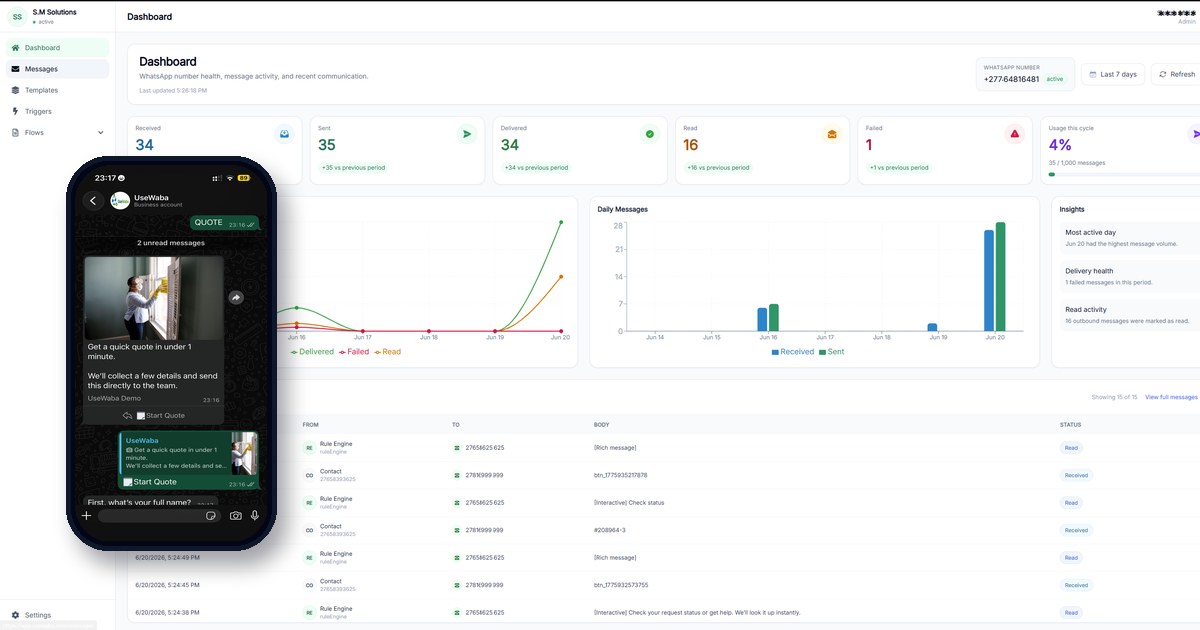
WhatsApp can still be structured
A workflow keeps the customer in WhatsApp while collecting the fields your team needs.
WhatsApp lead capture vs website forms
Practical comparison
The right choice depends on traffic source, urgency, and how your team follows up.
| Factor | WhatsApp workflow | Website form |
|---|---|---|
| Mobile friction | Low. Customer starts inside a familiar messaging app. | Depends on form length and mobile design. |
| Structure | Needs a guided workflow to collect fields consistently. | Structured by default. |
| Response speed | Feels immediate and conversational. | Often feels like submit-and-wait. |
| Routing | Can route by answer, source, location, or urgency. | Routes well when fields are mapped correctly. |
| Best fit | Ads, bookings, service enquiries, support, local intent. | Formal requests, desktop research, longer applications. |
The best setup is often both
This is not a winner-takes-all decision. Many businesses should keep forms for structured website visitors and add WhatsApp workflows for mobile users, ads, urgent enquiries, and customers who want a faster conversation.
The key is to make both paths produce usable data. Whether a customer starts with a form or WhatsApp, the team should receive clean context and a clear next step.
Frequently asked questions
Should I remove my website contact form?
No, not by default. Keep it if it still creates good enquiries. Add WhatsApp lead capture where customers prefer a faster mobile conversation.
Can WhatsApp workflows send leads to the same place as forms?
Yes. WhatsApp workflow data can be handed off to Google Sheets, CRMs, webhooks, or internal queues depending on setup.
Is WhatsApp lead capture only for small businesses?
No. It is useful for any team that receives repeated customer requests through WhatsApp and needs a cleaner intake and handoff process.
Compare the experience with a live workflow
Try the demo workflows and see how WhatsApp can collect structured details before team handoff.
Related articles
Lead capture
How to automate WhatsApp lead capture for your business
A practical implementation guide for turning WhatsApp enquiries from ads, websites, and direct messages into qualified lead records.
Read articleLead intake
Campaign-to-WhatsApp workflow: how to qualify customer interest before team handoff
A practical guide for turning campaign responses and short WhatsApp messages into usable context before a team follows up.
Read articleQuote workflows
Build a WhatsApp quote request workflow
A step-by-step guide for replacing loose quote request chats with structured WhatsApp intake and cleaner team handoff.
Read article