How to automate WhatsApp lead capture for your business
Learn how to automate WhatsApp lead capture with structured intake questions, qualification rules, source tracking, team handoff, and CRM or Google Sheets routing.
Share this article
Share the article link with your team or network.
Most WhatsApp lead capture problems are not caused by WhatsApp itself. They happen because every new enquiry starts as an unstructured chat.
This guide shows how to turn those messages into a repeatable workflow that collects the right details, qualifies the request, and gives your team a cleaner starting point.
When WhatsApp lead capture needs automation
Automation is useful when your team repeatedly asks the same questions before a lead can be handled. If every enquiry needs name, location, service interest, timing, and readiness, those details should not depend on a person typing them manually every time.
The best starting point is not a complex chatbot. It is a short intake workflow that asks useful questions and prepares the next step.
- Leads arrive from ads, website buttons, QR codes, or direct WhatsApp messages.
- The first reply often asks for the same basic information.
- Sales or service teams lose context when chats get busy.
- Leads need to be routed by branch, region, service, urgency, or source.
Map the lead capture workflow before building it
Before choosing questions or integrations, write down what a qualified lead means for your business. A property company, training provider, repair business, and financial service will each need different details.
A useful lead capture workflow usually has four layers: entry source, customer intent, qualification details, and team handoff.
Identify entry points
List where leads start: Facebook ads, Google ads, website buttons, QR codes, email signatures, or direct WhatsApp saves.
Define lead types
Separate enquiries into practical categories such as quote request, booking request, support issue, rental interest, or application intake.
Choose the minimum questions
Ask only for information that changes the next action. Avoid collecting details your team will not use.
Decide the handoff
Choose whether the lead should go to a team member, a Google Sheet, a CRM, a webhook, or a shared operational queue.
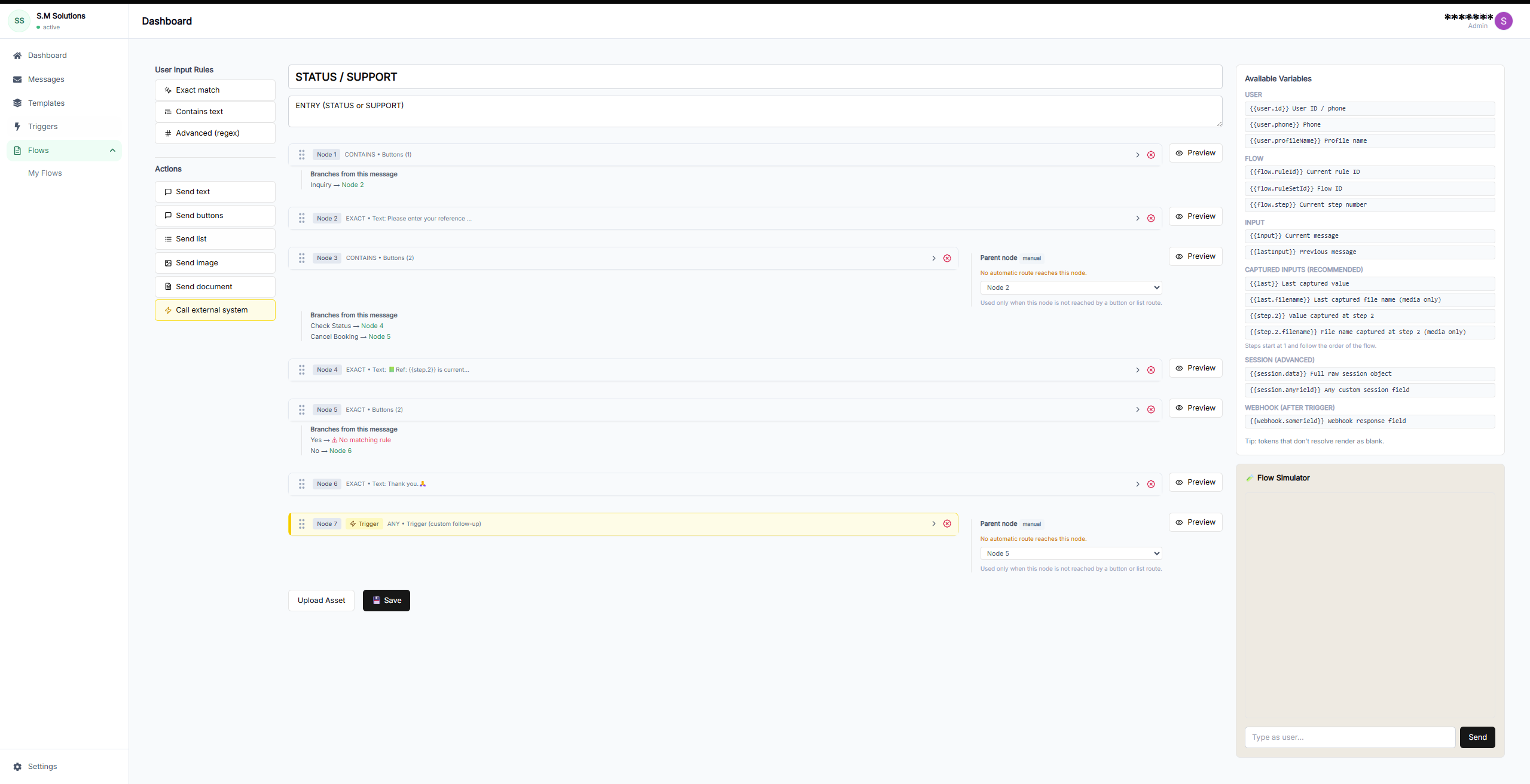
Build the intake once
A reusable workflow lets every lead go through the same first layer of qualification before handoff.
Capture the fields that make follow-up faster
The goal is not to collect everything. The goal is to remove the first layer of uncertainty so the next person can respond with useful context.
- Name and preferred contact details
- Lead source or campaign context
- Product, service, booking, or support interest
- Location, branch, or service area
- Timing, urgency, or preferred appointment window
- Budget, readiness, document status, or fit checks where relevant
Route the lead to the right next step
A captured lead is only useful if it reaches the right place. For a small team, this may be a WhatsApp summary and a Google Sheet row. For a larger team, it may be a CRM record, webhook trigger, or branch-specific queue.
Routing should be based on the information collected in the workflow, not on someone reading every chat from the top.
Common handoff options
Choose the handoff that matches how your team already works.
| Factor | Handoff | Best for | Watch out for |
|---|---|---|---|
| Team summary | WhatsApp or internal team summary | Small teams that need fast context | Can become hard to audit without logging |
| Google Sheets | Append each lead to a sheet | Simple tracking and follow-up queues | Needs ownership rules as volume grows |
| CRM | Create or update a lead record | Sales teams with pipeline stages | Field mapping must stay clean |
| Webhook | Send structured data to an endpoint | Custom systems and operations teams | Needs reliable error handling |
Measure whether lead capture is improving
A WhatsApp lead capture workflow should improve business operations, not just add another tool. Track simple operational metrics before and after launch.
- How many leads include all required fields?
- How long does first useful response take?
- How many leads are routed to the wrong team?
- How many campaign responses become team-ready enquiries?
- Which sources produce the cleanest leads?
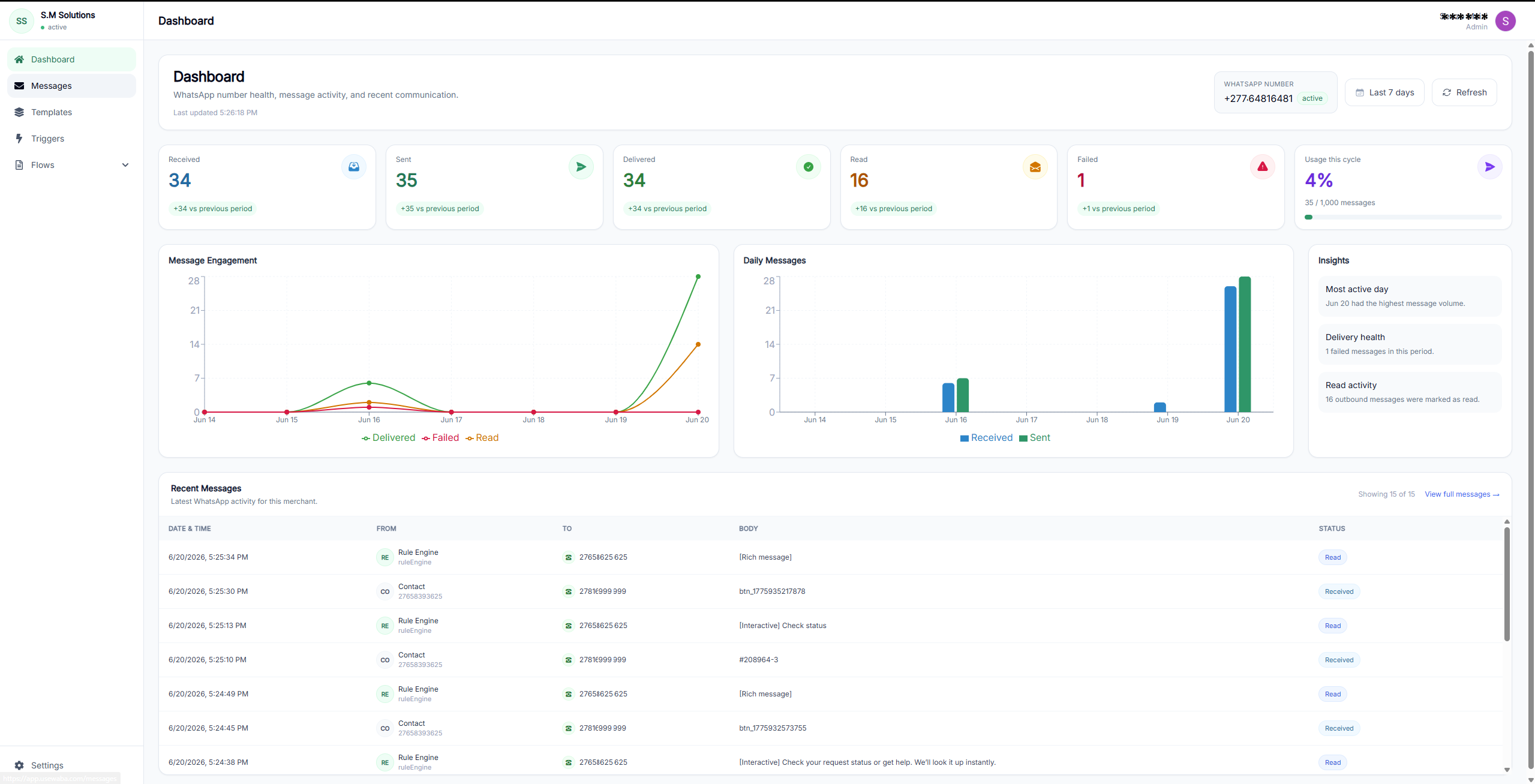
Track workflow activity
Use reporting and logs to understand how leads move from message to handoff.
Frequently asked questions
Can WhatsApp lead capture work without a website form?
Yes. Customers can start directly from WhatsApp links, ads, QR codes, or saved contact numbers. The workflow collects the structured details inside WhatsApp.
Should I replace my contact form with WhatsApp?
Not always. Keep the form if it works, but add WhatsApp when customers prefer a faster chat-based path or when mobile campaign traffic converts better through messaging.
Can leads be sent to Google Sheets or a CRM?
Yes. UseWaba supports structured handoff patterns such as Google Sheets, CRM updates, webhooks, and team summaries depending on setup.
How long should the first WhatsApp lead capture flow be?
Keep it short enough to complete in a chat. Start with the five to seven details your team needs before meaningful follow-up.
See a WhatsApp lead capture workflow in action
Try the live demos to see how customer messages become structured requests before your team follows up.
Related articles
Quote workflows
Build a WhatsApp quote request workflow
A step-by-step guide for replacing loose quote request chats with structured WhatsApp intake and cleaner team handoff.
Read articleComparison
WhatsApp lead capture vs website contact forms
A practical comparison for businesses deciding when to use WhatsApp workflows, website forms, or both.
Read articleBuyer guide
Best WhatsApp automation platforms for small businesses
A practical buyer guide for choosing the right WhatsApp automation platform based on workflow needs, integrations, and team handoff.
Read article